

Use Starlink as backup internet to protect your business from what is, for most modern companies, a catastrophic revenue event rather than a minor inconvenience. A fiber cut that takes your primary commercial connection offline for four hours means four hours of halted credit card transactions, unreachable remote employees, failed VoIP phone calls, and frustrated customers who cannot reach your team.
If your business relies on point-of-sale (POS) systems, cloud-based ERP software, remote monitoring equipment, or any kind of real-time data pipeline, you already know the brutal math: downtime costs vastly more than redundancy ever will.
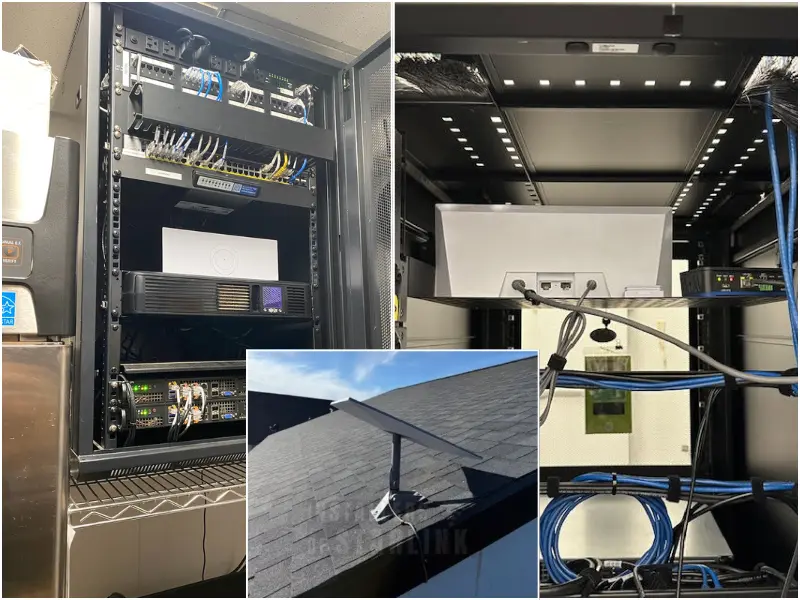
Starlink backup internet has quietly become one of the most practical, robust, and cost-effective failover solutions available to businesses in 2026. This is no longer just a solution for rural agricultural facilities where satellite is the only viable option. We are increasingly deploying Starlink in dense suburban and urban commercial environments where businesses want a secondary internet path that is entirely independent of the terrestrial infrastructure. When your primary fiber line goes down because a careless contractor cut a conduit two blocks away, Starlink keeps your operations running flawlessly. It utilizes a completely different physical layer, different hardware infrastructure, and entirely different failure modes. This comprehensive guide is built for IT managers, network administrators, operations directors, and business owners. We are going to break down exactly how a Starlink failover setup integrates into an existing enterprise network—including how it functions with traditional dual-WAN routers, advanced SD-WAN platforms, commercial metal roof mounting standards, and crucial hardware specifications.

Why Use Starlink as Backup Internet for Failover Connectivity
When you use Starlink as backup internet, you gain a connection that fails completely independently of any terrestrial outage. For most modern businesses, internet downtime is not just a minor inconvenience—it is a catastrophic revenue event. A fiber cut that takes your primary commercial connection offline for four hours means four hours of halted credit card transactions, unreachable remote employees, failed VoIP phone calls, and frustrated customers who cannot reach your team.
When you use Starlink as backup internet, you gain a connection that fails completely independently of any terrestrial outage. The core value of any true backup internet connection is that it fails differently than your primary connection. A second fiber connection from the exact same carrier, running through the same underground conduit and terminating at the same local loop, is not genuinely redundant. It is simply a second path that will instantly go down for the exact same reason as the first. Even if you use a different terrestrial provider (like switching to a coaxial cable backup), those lines often share the same utility poles.
Starlink’s unique architecture is what makes it genuinely independent. The signal travels from the dish mounted securely on your commercial roof directly to a constellation of Low-Earth Orbit satellites flying at approximately 340 miles in altitude. From there, it beams to a Starlink ground station and out to the broader internet.
That specific path shares absolutely zero physical infrastructure with your fiber provider’s local loop, your local cable provider’s coaxial plant, or your fixed wireless provider’s tower network. A backhoe takes out a fiber trunk, an ice storm knocks out a local cellular tower, or a power surge takes down a neighborhood DSLAM—none of those terrestrial events will ever touch your Starlink connection.
In 2026, Starlink’s performance on its commercial tiers is more than capable of handling real enterprise failover loads. Typical speeds on the Starlink Business plan consistently run between 100 and 350 Mbps download, and 10 to 40 Mbps upload, with latency averaging an impressive 25 to 60 milliseconds. While that is not fiber-grade latency, it is more than sufficient to keep VoIP calls crystal clear, maintain video conferencing, allow seamless cloud application access, and process POS transactions instantly during an emergency.
Starlink for Business vs. Starlink Standard: What's the Right Plan?
Starlink offers several different service and hardware tiers, and choosing the correct one matters immensely for an enterprise failover deployment. Choosing the right plan is the first decision when you use Starlink as backup internet for a commercial site.

Starlink Standard (Residential): This is the entry-level plan utilizing the Gen 3 (Standard 4X) hardware. It works fine as a failover connection for small businesses with highly modest bandwidth needs—such as a small standalone retail shop or a home-based operation where failover is a nice-to-have safety net rather than a mission-critical requirement.
Starlink Business: This plan is purpose-built for commercial use and is what we strongly recommend for any mid-market business where failover connectivity genuinely needs to perform under the weight of an entire office staff. The Business plan provides higher sustained throughput, prioritized data access during peak network congestion, and a service level agreement (SLA) that the residential tier simply lacks. The hardware is also significantly upgraded: the Flat High-Performance Business dish features a wider 140-degree field of view, improved thermal management for extreme weather, and consistently higher sustained performance.
Starlink Priority: This is the highest tier available, designed for massive enterprises, maritime vessels, and high-demand users who need guaranteed bandwidth allocations. This is usually overkill for a standard standby failover application, but it is highly appropriate for businesses utilizing Starlink as a co-primary connection rather than just a true standby backup.
For the vast majority of commercial Starlink failover setups we deploy nationwide, the Starlink Business tier with the Flat High-Performance hardware is the perfect fit.
Three Ways to Use Starlink as Backup Internet in Your Network
There are three proven ways to use Starlink as backup internet inside an existing enterprise network.
This is the simplest way to use Starlink as backup internet for small to mid-size offices. Your primary fiber or cable connection plugs directly into the “WAN 1” port. The Starlink ethernet adapter plugs into “WAN 2”. Your network administrator simply configures WAN 2 as a standby failover interface.
When the router’s internal health-check mechanism detects that WAN 1 has gone down (typically by monitoring ping responses to a defined target like Google’s 8.8.8.8 DNS server), it automatically begins routing all outbound traffic through WAN 2 within a matter of seconds. When the fiber line on WAN 1 eventually recovers, the traffic seamlessly shifts back. Failover activation time with this approach is typically 10 to 45 seconds.
The CGNAT Consideration: Starlink’s standard service operates behind Carrier-Grade NAT (CGNAT). This means your Starlink connection does not present a publicly routable IP address by default. If your business hosts any inbound services (such as a VPN endpoint, a local web server, or a remote desktop gateway), CGNAT will instantly break those services during an outage. The solution is Starlink’s Public IP address add-on, available on Business and Priority plans. This provides a dedicated public IP address that fully supports inbound connections.
SD-WAN (Software-Defined Wide Area Network) platforms are purpose-built for exactly this complex scenario. They manage multiple WAN connections intelligently, route specific traffic types over the best available path, and failover between connections with sub-second precision. Starlink integrates cleanly into every major SD-WAN platform we work with, including Cisco Meraki, VMware SD-WAN, Fortinet Secure SD-WAN, and Cradlepoint. Larger organizations that use Starlink as backup internet behind an SD-WAN edge gain sub-second failover and application-aware routing.
What SD-WAN adds over basic dual-WAN failover:
Application-Aware Routing: You can define policies that route specific traffic types over specific links. For example, all VoIP and video traffic goes over fiber when available, while lower-priority traffic (like large software update downloads) is permanently offloaded to Starlink to preserve your fiber capacity.
Sub-Second Failover: Enterprise SD-WAN platforms detect link failure and shift traffic in under one second. This matters enormously for VoIP and real-time database applications where even a 10-second interruption is highly destructive.
Bypass Mode Configuration: A vital step in any professional SD-WAN integration is enabling Bypass Mode on the Starlink router. By default, the Starlink system performs its own NAT, creating a restrictive “double-NAT” condition when placed behind an SD-WAN edge device. Enabling Bypass Mode passes the WAN IP directly to your SD-WAN firewall.
A more specialized but increasingly common use case is deploying Starlink as a dedicated Out-of-Band Management (OOBM) connection. This is a completely separate, isolated network path used exclusively by IT staff for remote access to core network equipment during a total facility outage.
In this model, Starlink connects only to a secure terminal server, console server, or OOBM switch. During normal operations, it carries zero employee traffic. When the primary network goes completely dark, network engineers can still remotely SSH into switches, core routers, and firewalls through the Starlink connection to diagnose and resolve the outage, entirely eliminating the need to dispatch expensive on-site personnel.
The Physical Infrastructure: Commercial Roofs and Metal Panels
Regardless of which software integration model you deploy, the physical installation of the hardware on a commercial facility requires heavy-duty expertise. Warehouses, manufacturing plants, agricultural facilities, and rural commercial offices frequently feature vast metal roofs. Mounting a satellite system to commercial sheet metal requires vastly different hardware and sealants than residential shingles.
The Pros and Cons of Metal Roofs for Starlink
The Pros: Commercial metal roofs are structurally superior. When anchored directly to the heavy steel purlins beneath the metal panel, a Starlink mount becomes rock-solid and can easily withstand extreme, hurricane-force wind loads. Furthermore, standing-seam profiles allow for non-penetrating clamps that require absolutely zero drilling, preserving your building’s envelope entirely.
The Cons: Metal is a highly dynamic material. It expands significantly in the blistering summer heat and contracts violently in the freezing winter. This constant movement will quickly break standard rigid sealants loose, causing massive water leaks into your facility. Additionally, bare metal is incredibly slick, posing a severe fall hazard for inexperienced installers.
Commercial Mounting Options
To guarantee an enterprise-grade installation, we utilize the following specialized mounting methods:
Standing Seam Clamps (Non-Penetrating): If the building utilizes standing seam metal panels, we use structural S-5! clamps. These heavy-duty clamps bolt directly onto the raised seam using rounded set screws, offering massive wind resistance with zero drilled holes.
Ballast Mounts (Flat Commercial Roofs): Many retail centers and warehouses use flat TPO or low-slope metal roofs. We use a heavy galvanized steel frame that sits on the roof, isolated by a thick rubber pad to prevent galvanic corrosion, and is weighed down by concrete blocks.
Ridge Mounts: For exposed fastener (corrugated) agricultural buildings, a ridge mount safely straddles the peak of the roof, using opposing tension to hold the mast in place.
Through-Roof Penetrating Mounts: If a clamp is not viable, a penetrating mount must be used. We secure the mount by driving structural lag screws through the high ribs of the metal panel and directly into the steel purlins below.
Fascia or Wall Mounts: Often the smartest choice is to bypass the metal roof entirely. A heavy-duty wall mount lagged into the side of a concrete, brick, or wooden structure provides excellent height without ever touching the roof panels.
Safety First: Commercial Ladder and Roof Best Practices
Because our technicians are routinely navigating massive commercial metal roofs, OSHA-compliant safety practices are a mandatory part of our process. If your in-house facilities team ever attempts to service this exterior hardware, they must strictly follow these protocols:
The 4:1 Ladder Rule: For every 4 feet of vertical height, the base of the extension ladder must be placed exactly 1 foot away from the wall to prevent backward tipping.
Proper Footwear: Standard leather work boots will act like ice skates on a metal roof. Soft, rubber-soled, non-slip roofing boots are an absolute requirement.
Standoffs and Tie-Offs: The top of the ladder must be secured with a standoff bar to prevent lateral sliding. Commercial metal siding is slick, and a ladder can easily kick out sideways if not stabilized.
Fall Arrest Systems: If the commercial roof is steeper than a standard 4:12 pitch, or if any moisture is present on the metal, a personal fall arrest system consisting of a safety harness, a secured roof anchor, and a lifeline rope must be utilized.
Installation Do's and Don'ts for Business Continuity
To ensure your Starlink backup internet remains online during the worst possible storms, the physical cable run must be flawlessly executed. Here are the absolute Do’s and Don’ts of a professional commercial setup:
DO’s:
DO use the correct cable clips. The Starlink cable must be heavily supported along its entire exterior run to prevent sagging, wind-flap, and flex-stress at the delicate connectors. We use commercial-grade, UV-resistant cable clips.
DO space clips properly. We place one clip every 12 inches (1 foot) on vertical commercial cable runs, and every 18 to 24 inches on horizontal runs.
DO create a drip loop. Never run a cable completely straight into an exterior wall or server room conduit. Always create a downward U-shape curve in the cable just before the entry point so gravity forces rainwater to drip off the loop.
DO use the right sealants. Using the wrong sealant guarantees a catastrophic leak over your server racks. For roof penetrations, we strictly use a self-leveling polyurethane or butyl rubber lap sealant (like Geocel 2300 or Sika Multiseal) that stretches with the metal’s thermal cycling. For wall penetrations, high-quality exterior silicone caulk is applied.
DON’Ts:
DON’T cut the Starlink cable. The cables feature proprietary shielded SPX RJ45 connectors with specialized water seals. Cutting and manually splicing them voids the commercial warranty and inevitably causes voltage drops, resulting in the router constantly rebooting.
DON’T forget the Standard 4X Cable Length. If you are using the Standard Gen 3 (4X unit) for a smaller office failover, remember that it only includes a 15-meter (49.2-foot) cable straight out of the box. Commercial server rooms are often deep inside massive buildings. If you need more length, a 45-meter (147-foot) extension cable must be ordered prior to installation day.
DON’T use standard interior caulk on a roof. Standard bathroom silicone will rapidly degrade under intense commercial UV rays and temperature swings, failing in a matter of months.
What Starlink Backup Internet Costs for Businesses
Compared to the staggering cost of a single significant outage event—lost transactions, SLA penalties, idle labor hours, and customer churn—the math on a properly deployed Starlink failover solution is incredibly favorable. Most businesses recoup the hardware and installation cost with the prevention of a single hour-long outage. The total monthly investment to use Starlink as backup internet is trivial compared to the revenue lost in a single multi-hour outage.
Hardware and service costs for a commercial Starlink failover deployment break down as follows:
Starlink Business hardware: Approximately $2,500 for the Flat High-Performance kit. (Standard Gen 3 kits are $349 for smaller offices).
Starlink Business service: Starting at $250/month.
Static IP add-on: Approximately $5/month on eligible commercial plans.
Skip the Guesswork — We'll Handle Your Integration
Integrating a Starlink failover setup requires an intersection of heavy-duty physical construction skills and high-level IT networking knowledge. You need a team that knows how to safely navigate a slippery commercial metal roof, flawlessly seal a penetration, and correctly configure your hardware into bypass mode so your enterprise firewall can take over.
At Installers of Starlink (a DBA of Starlink Installation Techs LLC), we provide professional, enterprise-grade Starlink installation services nationwide. We handle the heavy lifting for commercial businesses, retail chains, agricultural facilities, residential homes, mobile RV fleets, and marine vessels across all 50 states. If you’re ready to use Starlink as backup internet for your business, our nationwide team can have you online in days.
Fast Scheduling: Our nationwide average scheduling time from first contact to installation is just 3 days.
Efficient Installs: The physical installation itself is typically completed in an average of 3 hours or less, minimizing any disruption to your facility.
Transparent Pricing: Our professional residential installs start at $385, while our commercial and business site installations start at $750 per site (dropping to $650 per site if you are outfitting 3 or more locations).
Ready to get scheduled? Call us at (877) 309-1050, fill out our free quote form or reach us via live chat—and expect a response in about 5 minutes. We’re available Monday through Friday, 6:00 AM to 11:00 PM, and weekends from 6:00 AM to 9:00 PM.
Connectivity News & Updates

Starlink for Businesses and Multi-Building Properties – Campus & Chain Solutions
In the modern commercial landscape, connectivity isn’t just an amenity—it’s...

T-Mobile SpaceX Starlink Usage: What T-Satellite Actually Lets You Do in 2026
T-Mobile SpaceX Starlink usage has gone from beta curiosity to...
T-Mobile Starlink Business Internet: SuperBroadband Explained
T-Mobile Starlink business internet officially became a real product on...

Starlink in Rural Areas – What to Expect and How We Make It Reliable
For decades, living in the country meant making a difficult...