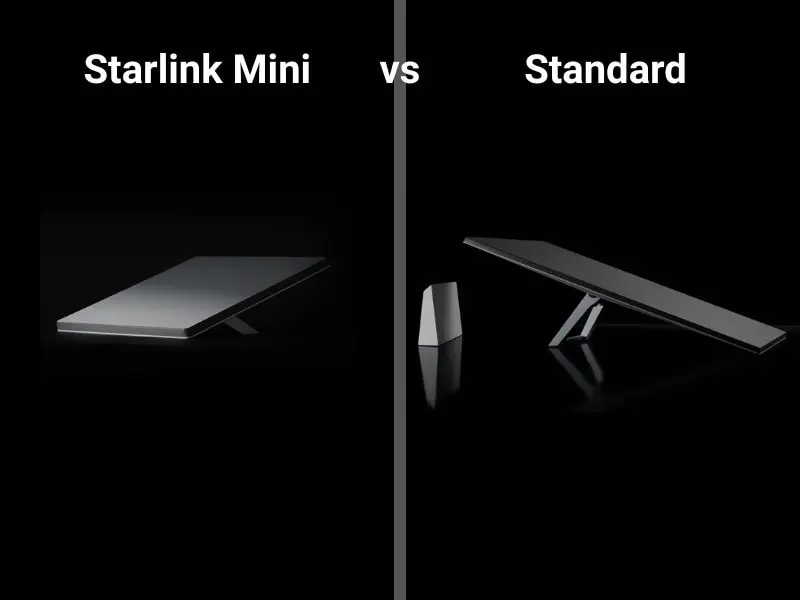
Starlink Mini vs Standard: Which Kit Fits Your Life in 2025

Updated: 12/08/2025

So, you’re wondering which system is better, Starlink mini vs standard? Well, it depends on your needs. If you need speed for a home or shop, choose Starlink Standard. It delivers higher throughput, wider Wi-Fi, and stronger peak capacity. If you need portable internet for travel, choose Starlink Mini. It trades raw speed for compact size, simple wiring, and low power draw.

Starlink Mini vs Standard: We explain the difference between the two in great detail.

However, your choice should match daily reality, not specs alone. Think about where you’ll use it most. Consider roof mounting, campsite setup, or a moving vehicle. Then weigh power limits, cable runs, and plan costs.

The Mini integrates the router in the dish. Setup is quick and tidy. It suits RVs, overlanding, and short stays. It draws far less power than the Standard kit. Therefore, batteries and small inverters handle it well.

The Standard kit ships with a separate, stronger router. It reaches farther and supports more devices. Through walls, it holds signal better. As a result, families and home offices notice fewer slowdowns.

Additionally, both kits share Starlink’s low-orbit advantage. Latency stays usable for calls and cloud apps. The app helps you align the dish and spot obstructions. You can install both yourself with basic tools.

In short, pick Standard for fixed, high-demand use. Pick Mini for portability and off-grid flexibility. The rest of this guide explains size, setup, Wi-Fi, power, and plans. Read on to match features to your day-to-day.

Starlink Mini and Standard Performance Wi-Fi Speed and device capacity test.

Size, setup, and portability: how much space and fuss?

The Starlink Mini is built for movement. The dish is smaller and lighter than the Standard unit. It slips into a backpack or seat bin easily. The kickstand flips out, and you are nearly done. Because the router lives inside the dish, you have fewer cables. Consequently, setup times drop to minutes at a campsite.

The Standard dish is larger and designed for staying put. You get a separate Wi-Fi 6 router with strong radios. That second box adds another cable and a power brick. However, the payoff is home-grade coverage. For many homes, the included router is enough. You can add mesh nodes if your layout needs more range.

Both kits include a 50-foot cable for flexible placement. You can place the dish on a stand for quick use. You can also mount it on a pole or roof with the right hardware. The app guides alignment, so pointing is simple. After lock, you rarely touch it again.

Transport matters as much as setup. The Mini’s small footprint fits tight storage. It moves daily without drama. Meanwhile, the Standard dish can travel with care. Yet most owners leave it installed once placed. Therefore, think about how often you will move the gear. Frequent movers favor Mini. Occasional movers can handle Standard.

Performance and Wi-Fi: speed, stability, and device capacity

When you’re considering Starlink mini vs Standard and you need headroom, the Starlink Standard wins. It serves more devices at once. It also holds higher speeds during busy hours. Video calls stay crisp while others stream or game. Uploads for work tasks feel smoother. Therefore, families and small offices prefer it.

The Mini focuses on essential tasks. It handles maps, messaging, email, and browsing. Streaming works, yet peak quality can drop sooner. During congestion, throughput falls faster than Standard. Nevertheless, latency remains competitive for calls. For one or two users, it stays practical.

Router differences matter indoors. The Standard kit’s separate Wi-Fi 6 router pushes a wider signal. It supports larger homes and denser device lists. Wired LAN ports help printers and media boxes. You can also extend with mesh nodes later.

The Mini uses an integrated Wi-Fi 5 radio. Range is tighter by design. It suits a van, a campsite, or a small cabin. You still get dual-band support and stable sessions. However, walls and long distances reduce performance. Plan for one room or an outdoor setup.

Additionally, both kits benefit from clear sky views. Use the app’s obstruction tool before you mount. Trim branches, or move away from trees if possible. A small relocation can double real-world speeds. Good placement beats any router tweak indoors.

Power, durability, and off-grid living: what keeps you online

Power is the Mini’s superpower. Typical draw sits far below the Standard kit. Many users run Mini from batteries or vehicle DC. You can pair it with modest solar and a compact inverter. As a result, boondocking and field work become realistic. The single-cable design also simplifies weatherproofing in the wild.

The Standard kit expects wall power. It draws more to feed stronger radios and heaters. That extra wattage improves stability during storms. Snow melt functions help keep the face clear. Therefore, cold climate owners often value the bigger headroom.

Weather protection is strong on both systems. The dishes handle rain, dust, heat, and cold. Cables and connectors lock firmly when seated. Still, route cables with drip loops and strain relief. Avoid sharp bends and hot exhaust paths. Additionally, use UV-rated clips for long exterior runs.

Consider vehicle integration as well. The Mini’s low draw fits overland power budgets. It can run from 12-volt systems with proper adapters. The Standard kit strains smaller batteries more. That load can cut runtime and add generator hours. Therefore, off-grid users tend to choose Mini first.

Finally, when considering Starlink mini vs Standard, think about maintenance. Check connectors after rough travel. Re-scan for obstructions each season. Clean the dish gently if debris accumulates. Small habits protect speeds and uptime across both kits.

Plans, costs, and ownership: what you actually pay for

Hardware pricing fluctuates, so compare current offers. The Standard kit often matches or beats the Mini upfront. Retailers sometimes run aggressive promotions. However, your real cost comes from the monthly plan.

The Standard residential plan targets primary home internet. It usually includes unlimited data for one service address. It delivers higher speeds and steadier peaks. Therefore, heavy users see value despite higher monthly cost.

The Mini pairs best with Roam style plans. The entry plan includes a data cap at a low price. You can step up to an unlimited roaming tier. Roam gives you flexibility across locations. However, throughput remains closer to the Mini’s limits. As a result, heavy streamers may exceed soft caps quickly.

Additionally, both services allow pausing in the app. Seasonal users can save during downtime. You can also move between addresses with supported plans. Read the details; some changes affect priority and speed.

Accessories add to your total as well. Roof mounts and poles improve line of sight. Ethernet adapters help wired devices. Mesh nodes extend coverage for large homes. Budget for these items when planning your install.

In short, pick a Starlink plan that matches usage patterns. Stationary homes with high demand favor Standard. Travelers and light users gain with Mini plus flexible billing. Align your wallet with your real habits, not hopes.

Video: Starlink Mini vs Standard: Which Is Best for You?

This video covers setup, portability, speed tests, power use, and which one is recommended, depending on how you live – whether that’s full-time RVing, going off-grid, or a cabin in the woods.

Decision guide: clear scenarios and a final verdict

Choose Starlink Mini if you move often. Campers, van-lifers, and event crews benefit most. You need quick setup, low power draw, and small packs. You accept reduced speeds for freedom and simplicity. You value a single box with fewer cables and parts. Therefore, Mini keeps you productive while traveling.

Choose Starlink Standard if your address matters. Homes, workshops, and teleworkers need throughput. You want stronger Wi-Fi and wider coverage. You plan to support many devices at once. You also want steadier speeds during busy evenings. Therefore, Standard provides a true primary connection.

Still unsure? Audit your next 90 days. Count nights away from your main address. List devices that must stay online. Note your power limits and mounting options. Then map those realities to Mini or Standard.

You can also mix approaches. Some owners run Standard at home. They keep a Mini for trips and outages. This combo costs more, yet it maximizes uptime. It also reduces friction when plans change suddenly.

Verdict: Stationary, high-demand users should choose Standard. Mobile, off-grid, or minimalist users should choose Mini. Match the kit to your daily life, and your experience will shine.

HOME | BLOG | LOCATIONS

Connectivity News & Updates

A detailed article comparing ASTS against Starlink.

ASTS vs Starlink

When people hear “satellite internet,” they often assume all space-based...