How to Install Starlink on a Roof

Starlink brings fast internet to places fiber cannot reach. A solid roof install protects that signal. This guide explains two common residential mounts, and how to install Starlink on a roof. We cover the pivot mount and the non-penetrating ridge mount. Both work on flat or pitched roofs with care. You will learn the tools, steps, and safety basics. We also note warranty and sealing pitfalls to avoid. Every roof is different, so plan before climbing.

How to Install Starlink on a Roof.

Walk the property and spot line-of-sight issues. Trees and chimneys can block the dish’s sky view. Check your router location and cable path as well. Measure the cable run and mark your entry point. Keep bends gentle and avoid hot flues.

Safety comes first on every job. Use a proper ladder and secure it well. Wear non-slip shoes and a fall harness. Work with a spotter whenever possible. Choose calm weather with dry surfaces. Never push on in strong wind or rain.

Some installs are best left to pros. Complex roofs and steep pitches raise risk. Warranty rules also vary by material and region. Poor sealing can void a roof warranty quickly. If in doubt, call Installers of Starlink. We handle assessment, mounting, and code compliance. If you prefer DIY, follow the steps below carefully.

Starlink Mounting Options.

Starlink Mounting Options

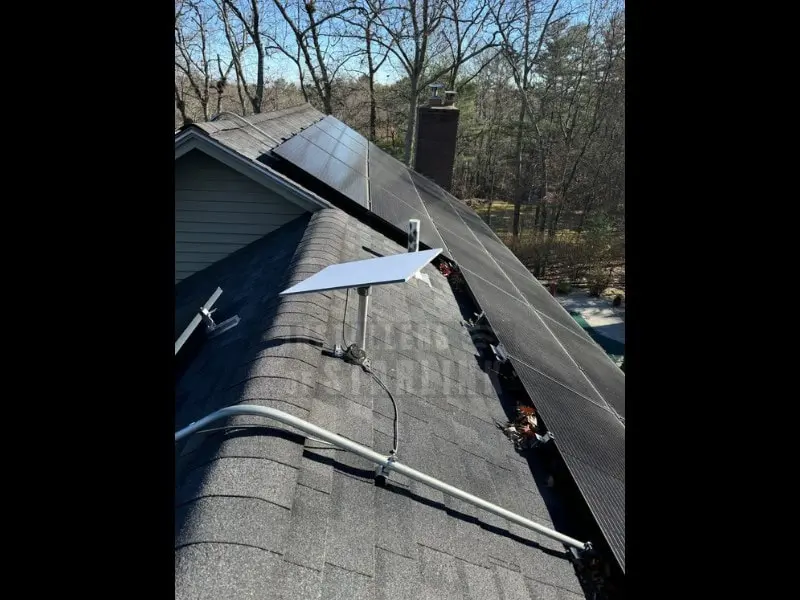
Starlink needs a wide, unobstructed sky view. The mount you choose protects that view long term. The pivot mount fastens through the roof deck. It offers a compact, rigid, and durable install. It suits most shingles, metal pans, and flat roofs. Correct sealing and flashing are essential for longevity.

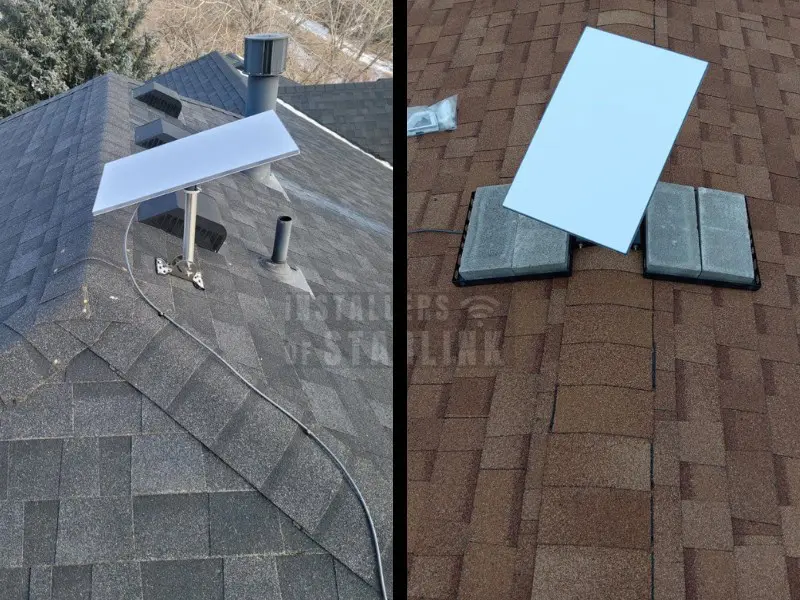
The non-penetrating ridge mount avoids roof holes. It relies on ballast weight and friction for stability. It works on flat or pitched roofs with proper loading. Use pavers or standard red bricks to weigh it down. Add a rubber mat to protect membranes and shingles. The mat spreads load and reduces slip risk. In windy areas, consider adhesive options on the mat. Some owners glue the mount to a rubber mat. They then bond the mat to the roof surface carefully.

Consider climate and roof type before deciding. High gust zones favor a bolted pivot mount. New or delicate roofs may favor non-penetrating options. Verify warranty terms for penetrations and adhesives. Plan cable routing and entry before setting hardware. Keep the run short and shaded when possible.

Installers of Starlink can evaluate both approaches quickly. We balance performance, safety, and warranty protection.

Pivot Mount: Step-by-Step Install

Start with layout and structure confirmation. Use a stud finder to locate rafters or blocking. Mark the mount base so bolts land in structure. Dry fit the base and check level and azimuth. Confirm the cable path and entry point location.

Pivot Mount Step-by-Step Install.

Drill pilot holes sized for the supplied lag bolts. Keep the drill square to the roof surface. Clear chips and test depth carefully. Apply roof-rated sealant into each pilot hole. Add butyl patches or flashing per the mount kit. Seat the base and align bolt holes over structure.

Install lag bolts and tighten gradually in sequence. Pull the base down evenly and do not over-torque. Wipe excess sealant and inspect the flashing edges. Attach the mast and confirm plumb with a level. Mount the dish and follow the Starlink app guidance. Align for maximum signal strength and stability.

Route the cable along ridges or seams neatly. Use UV-rated clips and avoid sharp bends. Create a drip loop before the entry point. Penetrate the wall or eave with a proper bushing. Seal both sides with rated sealant or grommets. Tack the cable to protect from wind and abrasion. Power up and verify connectivity and obstruction data.

Recheck all bolts and seals after the first storm.

Non-Penetrating Ridge Mount- Step-by-Step Install.

Non-Penetrating Ridge Mount: Step-by-Step Install

With a non-penetrating ridge mount (also compatible with flat roofs) Begin with the surface protection plan. Place a rubber mat under the mount footprint. The mat spreads load and protects the roof surface. Clean dust and granules before placing the mat. Check that the ridge contact points sit flat. Dry fit the mount and confirm plumb adjustment range.

Set initial ballast using pavers or red bricks. Distribute weight evenly on the tray or arms. Keep ballast clear of sharp edges and fasteners. Typical installs use multiple pavers for safety. Increase weight for higher wind exposure or taller masts. Follow the mount maker’s minimum ballast chart if provided.

Some roofs need extra hold in gusty zones. Many users glue the mount to a rubber mat. They then glue the mat to the roof to resist sliding. Use adhesives compatible with your roofing material. Test bond on a small, hidden area first. Avoid products that attack membranes or shingles. Do not block drainage paths with adhesive beads.

Mount the mast and dish and verify plumb. Align the dish using the Starlink app guidance. Route and tack the cable with UV-rated clips. Keep a drip loop at the eave or entry point. Avoid gutters, hot flues, and moving parts. Power up and confirm signal quality and stability.

Recheck ballast after strong winds and seasonal changes.

Roof Warranties, Fall Safety, and Pro Help

Roof warranties can be voided by poor sealing. Use sealants that match your roof material. Follow the mount kit’s flashing and patch instructions. Do not skip flashing on shingle penetrations. Avoid generic caulk that cracks in sunlight. Document your process and keep receipts and photos. Some warranties require licensed installers for penetrations. When unsure, call the manufacturer and ask directly.

Treat the roof like a controlled jobsite. Use a class-rated ladder and tie-offs. Wear a harness anchored to structure, not hardware. Keep tools leashed and pathways clear. Work only on dry, calm days with good light. Never step on brittle tiles near edges. Move slowly and plan each step before taking it. Keep one hand free for stability when possible. Have a ground spotter and phone within reach.

DIY saves money but adds risk and liability. Complex roofs and steep pitches multiply that risk. Hidden damage can grow if seals fail silently. Professional help reduces those risks dramatically. Installers of Starlink can manage the entire project. We plan, mount, seal, and route the system cleanly. We also respect warranty rules and local codes. Contact us if you want a safe, reliable installation.

Starlink Pivot Mount Roof Installation Video

Starlink Non-Penetrating Ridge Mount Installation Video

HOME | BLOG | LOCATIONS

Connectivity News & Updates

A detailed article comparing ASTS against Starlink.

ASTS vs Starlink

When people hear “satellite internet,” they often assume all space-based...