How to Get Internet from One Building to Another: Point-to-Point Wireless Bridge Installation Services

In today’s connected world, reliable internet access isn’t just a luxury—it’s essential for work, entertainment, and daily life. But what if your property spans multiple buildings, like a home office, barn, or guest house, and trenching cables isn’t feasible? That’s where point-to-point (P2P) wireless bridges come in – the answer for how to get internet from one building to another, without trenching.
Point-to-point wireless bridge installation services in all 50 U.S. states.

At Installers of Starlink, we specialize in seamless P2P installations that extend your Starlink internet without digging up your yard. This guide explains what P2P is, its benefits, and how it integrates with Starlink, helping you decide if it’s right for you. Whether you’re in a rural area or managing a multi-building setup, our services ensure fast, stable connectivity across your property.

What is a Point-to-Point Wireless Bridge and How Does It Work?

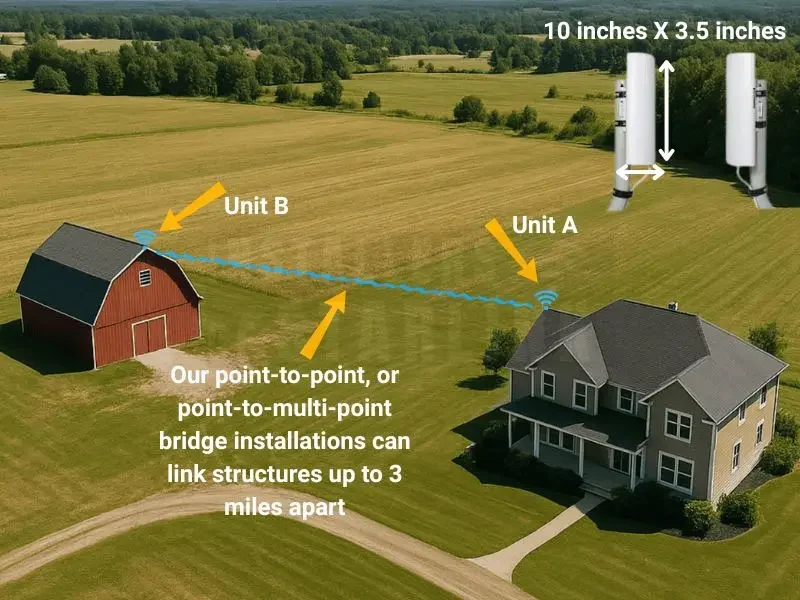
If you’ve ever wondered how to get WiFi from one building to another without running cables, a point-to-point wireless bridge is the answer. Simply put, it’s a pair of specialized devices that create a direct wireless link between two locations, acting like an invisible Ethernet cable. One unit (the transmitter) connects to your main internet source, such as a Starlink router, and beams the signal to a receiver in the remote building. This setup uses radio waves or lasers for data transmission, ensuring high-speed connectivity over distances up to several kilometers with clear line-of-sight.
 
For most people unfamiliar with networking, think of it like this: Your home’s WiFi router broadcasts signals in all directions, but that scatters the strength. A P2P bridge focuses the signal narrowly, like a spotlight, minimizing interference from trees, walls, or weather. Popular devices include Ubiquiti NanoBeams or TP-Link CPE series, which we often recommend for their reliability and ease of setup.
 
The process starts with mounting the units high on each building for optimal alignment—roofs or poles work best. Power them via Ethernet (PoE), connect the transmitter to your router, and configure via a simple app or web interface. No advanced tech skills needed; it’s plug-and-play for basic use. Once linked, the remote building gets full internet access, perfect for streaming, video calls, or smart devices.
 
Benefits include cost savings over fiber installation and quick deployment—often in hours. However, success depends on unobstructed views; minor obstacles like foliage can weaken signals. At Installers of Starlink, our certified technicians handle site surveys to ensure viability, using tools like the Starlink app for obstruction checks. This educational approach demystifies P2P, empowering you to understand why it’s a game-changer for properties where traditional wiring falls short.

When is a P2P Wireless Bridge Beneficial for Your Property?

Deciding when a P2P wireless bridge makes sense boils down to your setup and needs. If you’re searching for “how to get internet from one building to another” because trenching is expensive or impractical—think rocky terrain, leased land, or historic sites—a P2P bridge shines. It’s ideal for rural homes, farms, or small businesses with outbuildings like workshops, garages, or guest quarters separated by 100 feet to a mile.
 
For instance, imagine a family farm where the main house has Starlink, but the barn needs connectivity for security cameras or livestock monitoring. A P2P bridge extends that signal without monthly fees for extra plans, saving hundreds annually. It’s also great for temporary setups, like construction sites or events, where permanent cabling isn’t viable.
 
Key benefits include high speeds—up to 1 Gbps with modern kits—low latency for gaming or remote work, and scalability. Unlike WiFi extenders that halve speeds with each hop, P2P maintains near-original performance. It’s weather-resistant too, with IP-rated enclosures handling rain, snow, or dust.
 
Draw the line when distances exceed 5-10 km or heavy interference exists; that’s when alternatives like multiple Starlink kits might be better. But for most users, P2P is beneficial if you have line-of-sight and want to avoid degradation from overextending WiFi. Our experience shows clients often overlook this until we explain it—many start with weak repeaters, only to upgrade for reliability.
 
At Installers of Starlink, we assess your property via virtual surveys, recommending P2P when it fits. This not only educates you on options but ensures long-term satisfaction, preventing common pitfalls like signal drops from misalignment.

How P2P Works with Starlink Internet

Starlink’s satellite internet revolutionizes remote access, but extending it to another building requires smart integration. A P2P wireless bridge pairs perfectly with Starlink, turning your single dish into a multi-building powerhouse. Here’s how: Connect the bridge’s transmitter via Ethernet to your Starlink router (using the Gen 2 adapter or Gen 3 port). The receiver in the remote building links to a switch or access point, distributing WiFi locally.
 
This setup preserves Starlink’s 100-300 Mbps speeds across the bridge, as it acts like a direct cable. No data caps or throttling from the bridge itself—just pure extension. For Starlink users, it’s especially useful in off-grid spots where adding cables means permits or heavy machinery.
 
Installation is straightforward: We mount weatherproof units (like UeeVii or Ubiquiti models) on each structure, align them for max signal, and test for obstructions using Starlink’s app. Power comes via PoE injectors, keeping things tidy. In our nationwide services, we’ve seen P2P boost Starlink for RVs, marine vessels, and apartments by creating mesh-like networks without extra subscriptions.
 
Educating clients is key—many don’t realize P2P avoids the bandwidth splits of mesh systems. It’s beneficial for high-demand tasks like 4K streaming or VoIP calls across properties. Where to draw the line? If adding 2-3 remote buildings, P2P scales well with point-to-multipoint (P2MP) variants. Beyond that, performance may dip, signaling time for alternatives.
 
Our experts handle everything, from kit selection to optimization, ensuring your Starlink shines everywhere. This integration not only informs you but delivers reliable, future-proof connectivity.

Knowing the Limitations: When to Opt for Multiple Starlink Kits Instead

While P2P wireless bridges are fantastic for extending internet, they’re not unlimited. Understanding drawbacks helps you decide when another Starlink kit is wiser. Primary limitations include distance—beyond 1-2 km without amplifiers, signals weaken, especially with obstacles like dense trees or hills. Interference from other wireless devices can also degrade performance, though 5GHz bands mitigate this.
 
A big factor is scale: Adding too many P2P or P2MP units to one Starlink connection risks overload. Each bridge shares the bandwidth, so if multiple buildings have heavy users (e.g., simultaneous uploads/downloads), speeds drop below 50 Mbps per site. Starlink’s 1-5 TB priority data caps apply network-wide, accelerating throttling.
 
Draw the line at 3-4 buildings or high-usage scenarios. If independence is key—like separate billing for tenants—or redundancy for critical work, multiple kits excel. Each dish gets its own subscription (starting at $120/month), ensuring full speeds without sharing. Can’t use one plan for two dishes; Starlink requires separate accounts, though pausing unused ones saves money.
 
For example, a large farm might use P2P for nearby sheds but add kits for distant ones to avoid degradation. Our advice: Start with a site survey. If P2P fits, it’s cost-effective; otherwise, multiple kits provide isolation.
 
At Installers of Starlink, we educate on these trade-offs, offering installations for both. This ensures informed choices, preventing regrets like poor performance from overextending one setup.
 
If you could use some help with your point-to-point wireless bridge installation and setup, contact us for a complimentary consultation!

Video Guide: Extending Starlink to Another Building with a Point-to-Point Wireless Bridge

Our helpful YouTube video details what a point-to-point wireless bridge is, how it functions, and how you can get your Starlink internet from one building to another – without trenching or needing to buy another Starlink.

Connectivity News & Updates

Disclaimer: InstallersofStarlink.com is an independent business and has no affiliation or official connection with Starlink, SpaceX, or any of their subsidiaries or affiliates. We are not associated with, authorized, endorsed, or sponsored by these companies in any capacity. For official information, please visit the Starlink and SpaceX websites at www.starlink.com and www.spacex.com. The names “Starlink,” “SpaceX,” and any related trademarks, logos, or imagery are the exclusive property of their respective owners.